Free Stencil Maker
Photo Stencil Maker turns any photo into a clean, printable stencil in seconds: line art or a cut-out stencil, no sign-up, no watermark, and your photo never leaves your device.
- Free & unlimited
- No sign-up
- No watermark
- Nothing uploaded
or drag & drop it here, or paste with Ctrl+V
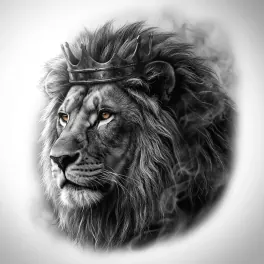
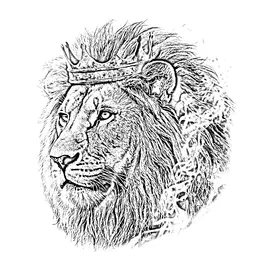
More options
Saved! For portraits, fur and shading, Stencil AI turns the same photo into clean linework and hatching.
Too sketchy? Stencil AI redraws the same photo as clean, tattoo-ready lines.
🔒 Runs in your browser. Your photo is never uploaded.
How to make a stencil from a photo
Upload your photo
Pick any JPG, PNG or WebP, drag it onto the tool, or paste it with Ctrl+V. On a phone, take a photo or choose one from your gallery.
Set the detail
Move the Detail slider. Left keeps only clean outlines; right adds shading and texture. Press and hold the image to compare it with the original.
Download or print
Save a full-resolution PNG, or print it straight onto paper, transfer paper or a thermal stencil printer.
How this photo to stencil converter works
Most picture stencil makers use a single brightness cutoff (a threshold), which turns soft shadows into black blobs. This stencil generator uses the trick artists use in Procreate and Photoshop instead. Your photo is turned into grayscale, a blurred copy is made, and the original is divided by the blurred copy. Wherever a pixel is about as bright as its surroundings, the result is white. Wherever it is darker, along edges, creases and shadows, a line appears.
The Detail slider sets the blur radius. A small radius only catches sharp edges, so you get thin outlines. A large radius also catches broad shadows, so you get a shaded, sketch-like stencil. Darkness, under More options, sets how bold the lines print.
Need a stencil you can cut instead of trace? Solid (cut-out) turns the photo into clean black shapes, removes specks and counts the floating pieces that would need bridges. Everything runs on your device, with no upload, no queue and no account, which is why it’s instant and can stay free. Prefer to do it by hand? See how to make a stencil from a photo or the Procreate method.
Why use this stencil maker?
- Free and unlimited. No credits, no daily cap, no “HD download” upsell.
- Nothing is uploaded. The photo is converted on your device, so it stays private.
- Full resolution. Downloads keep up to 4000 pixels, enough to print a large piece sharply.
- Live preview. The stencil updates as you drag the slider; there’s no waiting for a server.
- Mirror and pure black & white. Flip the stencil for transfer methods that need it, or make it solid black for cutting.
- Works on any device. Phone, tablet or computer, in any modern browser, with no app to install.
What can you make with a photo stencil?
Tattoo stencils
Turn a reference photo into linework for a thermal printer or transfer paper. The tattoo stencil maker has tattoo-specific settings and tips.
Painting and murals
Trace the stencil onto a canvas, wall or board to get the proportions right before you paint.
Wood burning and engraving
Transfer the lines onto wood and burn or carve along them. The wood burning stencil maker covers mirroring and transfer methods.
Embroidery and fabric
Print the outline onto transfer paper, or trace it onto fabric with a water-soluble pen.
Spray paint and cut-outs
Switch to Solid (cut-out) for clean black shapes, then print and cut. See the spray paint stencil guide, or carve one into a pumpkin.
Drawing practice and coloring pages
Use a low Detail setting to get clean outlines you can trace, shade or color in.
Tips for a better stencil
- Use a sharp, well-lit photo. Clear light and shadow give clean lines. Dark or blurry photos turn grey and mushy.
- Crop tight. Cut away everything except the subject before you upload, so the background doesn’t become lines.
- Start low on Detail. Begin with clean outlines and add detail only until the shapes read. Small designs need less.
- Lines too faint? Open More options and raise Darkness, or switch on Pure black & white.
- Too many speckles? Lower Detail, or use a less grainy photo. The filter copies skin pores and image noise too.
- Need an exact print size? Download the PNG and set the size in your printer app, or use Stencil AI, which prints stencils at the exact size of the tattoo.
When a filter isn’t enough
This tool traces changes in brightness, so it copies everything: skin texture, noise, the background. That’s perfect for bold, simple images. For portraits, fur and soft shading, an AI stencil maker redraws the subject as clean lines instead.
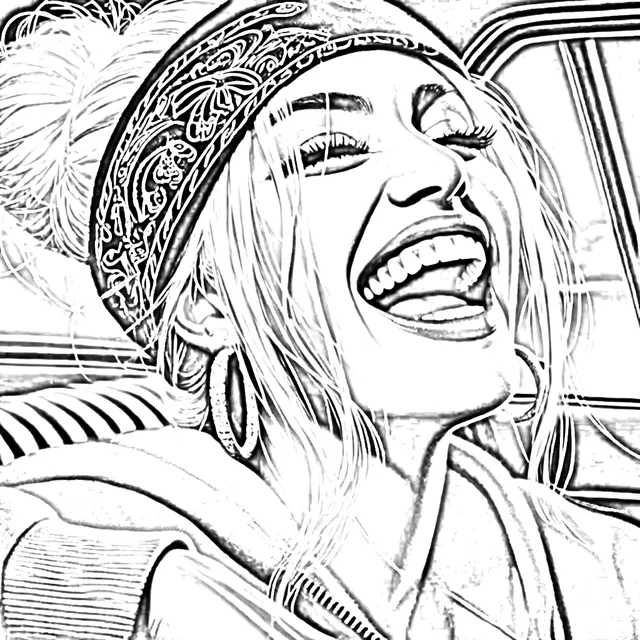
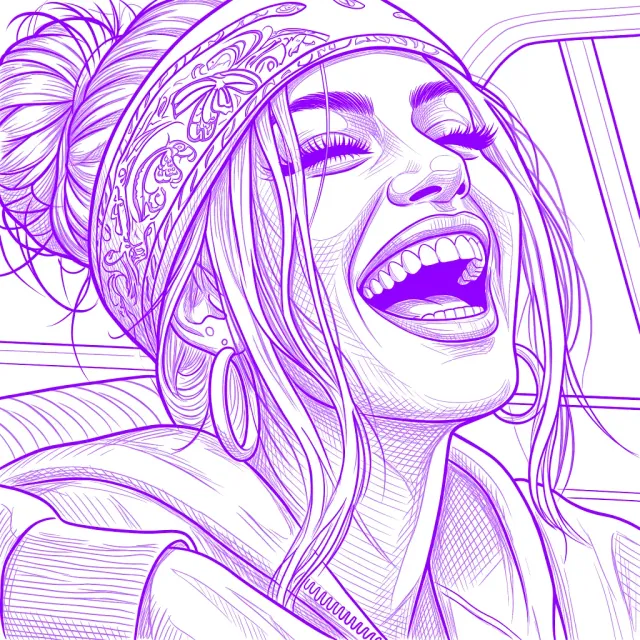
- Clean, closed outlines instead of sketchy edges
- Shadows turned into printable hatching
- Print at exact size, warp to the body, retouch
- On iPhone, iPad, Android and the web
Made by the same team. This tool stays free.
Frequently asked questions
Is this stencil maker really free?
Yes. There are no credits, no sign-up and no watermark, and no limit on how many stencils you make. It can stay free because it runs entirely in your browser, so a photo costs us nothing to process.
Do you upload or store my photos?
No. Your photo is processed on your own device and is never sent to a server, so nobody else ever sees it.
What kind of photo makes the best stencil?
A sharp photo with strong light and shadow and a simple background. Portraits, animals, objects and lettering all work. Avoid dark, blurry or heavily filtered photos, and crop away anything you don’t want in the stencil.
Can I make tattoo stencils with it?
Yes. Use a low-to-medium Detail setting for clean linework, then print the PNG on a thermal stencil printer or trace it onto transfer paper. The tattoo stencil maker page has tattoo-specific tips.
How do I print the stencil?
Press Print to print it on one page, scaled to fit, or choose “Save as PDF” in the print dialog. Need it at the exact size of the tattoo? Stencil AI prints stencils at true size.
How is this different from an AI stencil maker?
This tool applies one filter to every pixel, just like the Procreate blur-and-divide trick. An AI stencil maker such as Stencil AI looks at what’s in the photo and redraws it as clean outlines and hatching, which matters most for portraits, fur and realism.
Does it work on iPhone, iPad and Android?
Yes. It works in any modern browser, including Safari, Chrome, Firefox and Edge, on phones, tablets and computers. There’s no app to install.
Can I use the stencils commercially?
Yes. We add no watermark and claim no rights to your stencils. Just make sure you have the right to use the original photo.
Can I get an SVG for Cricut or a laser cutter?
Not as a vector file yet. Switch to Solid (cut-out) and download the PNG: Cricut Design Space can turn it into a cut image, and most laser software can trace it. More in the spray paint stencil guide.
Which file types can I use?
Anything your browser can open: JPG, PNG, WebP and GIF, plus HEIC photos from the iPhone photo library. Downloads are full-resolution PNG files.